WooCommerce Zoho CRM Integration
A custom, real-time sync between WooCommerce and Zoho CRM. Orders, customers and quotes arrive in Zoho the moment they happen, with every sync logged and failures retried automatically.
Why off-the-shelf Zoho connectors fall short
Zoho's own integrations and generic connector plugins handle the basics: a new customer becomes a Contact. Real businesses usually need more:
- Quotes, not just orders, with custom quote logic and variable products
- Custom fields and modules in your Zoho setup
- Deals created or updated based on order status
- Deduplication so returning customers don't create new Contacts
- Error visibility instead of silent failures when Zoho's API rejects a record
- Historical backfill of existing orders
When the connector can't map your process, your sales team goes back to copy-paste, and the data drifts.
What can be synced
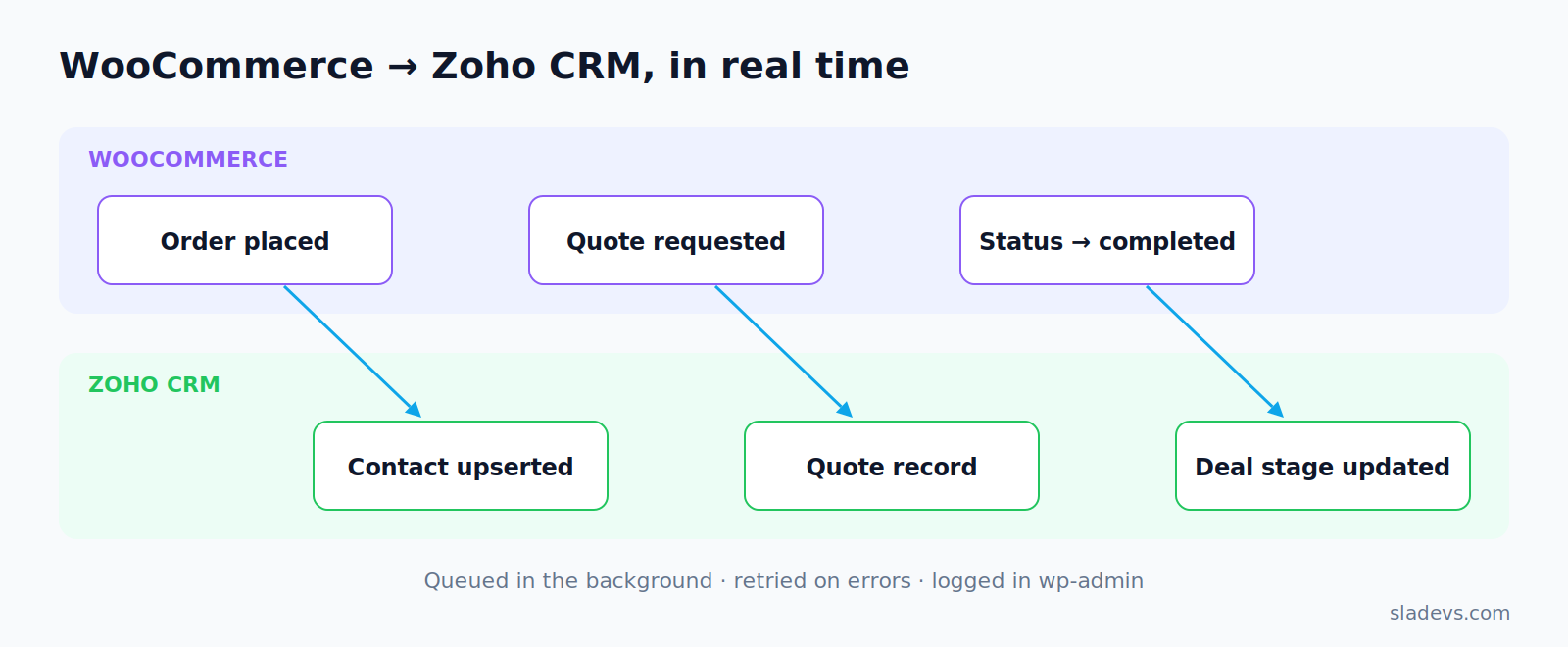
- Orders → Deals or Sales Orders, with line items
- Customers → Contacts / Accounts, deduplicated by email
- Quotes → Quotes module, including variable products
- Products ↔ Products, optionally with price and stock
- Order status → Deal stage (and back, if needed)
- Form leads → Leads. See WPForms to Zoho CRM.
How the integration works
- A WooCommerce event fires (order created, status changed, quote requested).
- The event is added to a background queue, so checkout never waits for Zoho.
- The sync job maps WooCommerce data to your Zoho modules and fields, then upserts the record, updating it if it exists and creating it if it doesn't.
- Success or failure is logged. Temporary errors are retried with backoff, and permanent errors are flagged in wp-admin with the reason.
- Zoho OAuth tokens refresh automatically, and API rate limits are respected.
For the full technical breakdown, read Building a real-time WooCommerce to Zoho CRM integration.
Built for reliability
- ✓Zoho CRM API v2+ with OAuth 2.0 and region-aware endpoints (.com, .eu, .in, .com.au)
- ✓Action Scheduler queue with retries and backoff
- ✓Idempotent upserts, so there are no duplicates
- ✓Admin sync log with a manual re-sync button
- ✓Field mapping configurable in settings
- ✓HPOS-compatible WooCommerce order handling
Project steps
- Mapping session: which WooCommerce data goes to which Zoho module and field
- Fixed-price proposal with the mapping attached
- Build against a Zoho sandbox or test organization
- Backfill historical data, then switch on real-time sync
- Handoff: sync-log walkthrough, documentation and 14 days of fixes
Proven in production
In the WooCommerce to Zoho CRM sync case study, a real-time integration replaced manual lead and order handling. It extended a custom quote plugin so orders and quotes flowed straight into Zoho. The result was 60% time saved, zero manual errors, and faster sales processing.
Need a different CRM? See other CRM and API integrations.
Questions I get asked
Does it work with Zoho CRM Plus, Zoho One and different Zoho regions?
Yes. The integration uses the Zoho CRM API, which is the same across editions, and supports the region-specific data centers.
What happens if Zoho is down or rejects a record?
The sync is queued and retried automatically. Anything that still fails is listed in wp-admin with Zoho's error message and a one-click re-sync.
Can it sync from Zoho back to WooCommerce?
Yes, using Zoho workflow webhooks, for example deal stage → order status, or price updates.
How long does it take?
A typical one-way order and customer sync takes 3–5 weeks, depending on the mapping and backfill size.
Keep exploring.
Custom WooCommerce HubSpot Integration
When HubSpot's standard WooCommerce connector doesn't match your sales process, a custom integration syncs exactly the data you need, including…
Learn More about Custom WooCommerce HubSpot Integration →Hire a WooCommerce Developer for Custom Store Builds
Custom WooCommerce development for stores that have outgrown default behavior: checkout workflows, quote systems, order automation and payment integrations, built…
Learn More about Hire a WooCommerce Developer for Custom Store Builds →Automated WooCommerce to Zoho CRM Sync
60% time saved, zero manual errors, faster sales processing
Read case study →Want WooCommerce and Zoho to finally agree?
Tell me which Zoho modules you use and what should sync. I'll reply within 24–48 hours.